Composable Components and the Visual Canvas: How Kapi Makes AI Agents Buildable
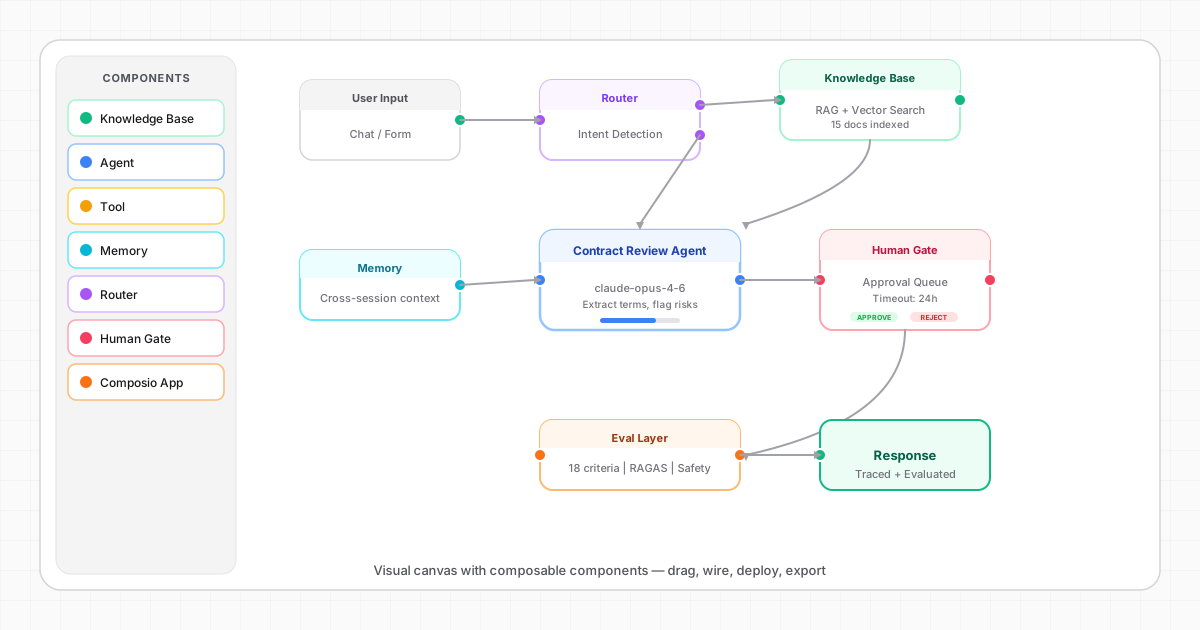
Every AI platform has a canvas. Drag some nodes, connect them with lines, hit run. It's the standard playbook.
So why did we build another one?
Because most canvases are solving the wrong problem. They make it easy to connect APIs. But connecting APIs isn't the hard part of building enterprise AI agents. The hard part is composing behavior — getting knowledge, memory, routing, human oversight, and quality checks to work together as a coherent system.
Kapi's canvas isn't a flow builder. It's a composition engine.
The Problem with Flow Builders
Traditional flow builders work like this: you have a trigger, some processing steps, and an output. Data flows linearly from left to right, with maybe some branching. It's essentially visual programming.
This works beautifully for automation — "when an email arrives, extract the attachment, save it to Drive, notify on Slack." Linear, predictable, deterministic.
But AI agents aren't linear or predictable. They need to:
- Route dynamically based on intent detection ("is this a billing question or a technical one?")
- Retrieve context from multiple knowledge sources and rank the results
- Remember what happened in previous conversations with this user
- Decide whether to act autonomously or ask for human approval
- Evaluate their own output quality before sending
- Trace every step for debugging and compliance
You can't express this as a simple left-to-right flow. You need composable components — independent building blocks that each handle one concern and snap together in any configuration.
What We Mean by Composable
In Kapi, every capability is a standalone component:
Knowledge Base — Upload documents, configure chunking strategy, set retrieval parameters. This component handles vector search, hybrid ranking, and citation generation independently.
Agent — The reasoning core. Configure the LLM, system prompt, temperature, and output format. Connect it to tools, knowledge bases, and memory stores.
Tool — A specific capability the agent can invoke: search the web, query a database, call an API, generate an image. Each tool has its own input schema and error handling.
Memory — Cross-session context storage. Configure what gets remembered (user preferences, key facts, entities) and how long it persists.
Router — Intent detection and traffic routing. Route queries to specialist agents based on topic, confidence, or user role.
Human Gate — A HITL checkpoint. Configure the approval pattern (autonomous, approval, review, escalation), timeout behavior, and routing rules.
Composio App — One of 150+ pre-built integrations. CRM, email, calendar, project management — configured once, available to every agent.
Each component is independently configurable, testable, and replaceable. Swap out a knowledge base without touching the agent logic. Add a human gate without restructuring the workflow. Upgrade the LLM without changing anything else.
The Canvas Experience
Here's what building on Kapi's canvas actually feels like:
1. Describe Your Use Case
You start by describing what you need: "I want a contract review agent that extracts key terms, flags risky clauses, and routes high-value contracts for human approval."
Kapi auto-generates a working workflow on the canvas — complete with knowledge base, agent, router, human gate, and evaluation components, all wired together.
2. Customize Visually
Every component on the canvas is clickable. Open the Knowledge Base component to configure chunking strategy. Open the Human Gate to set approval rules. Open the Agent to refine the system prompt.
No code. No YAML files. Just direct manipulation of each component's configuration.
3. Test in Real-Time
The canvas includes live preview. Upload a test document, send a query, and watch the agent work — step by step. See which components activated, what decisions were made, and how the output was generated.
4. Deploy
One click. Your agent is live with a shareable URL. Every component you configured on the canvas is now running in production, with full tracing and evaluation enabled automatically.
5. Export
When you're ready to own the code, export everything. The canvas components become clean, modular source files — a LangGraph workflow, React components, API routes, and configuration files. No proprietary formats. No vendor lock-in.
Why Composability Matters for Enterprises
Enterprise AI deployments have unique requirements that monolithic platforms can't serve:
Different teams, different needs. The HR team's agent needs different knowledge bases, different approval rules, and different evaluation criteria than the Legal team's agent. Composable components mean you configure each concern independently.
Progressive rollout. Start with everything requiring human approval. As confidence builds, move low-risk actions to autonomous mode — one component at a time, without restructuring the entire workflow.
Compliance by design. Drop a Human Gate component into any workflow and you have auditable human oversight. Drop an Eval component and you have quality monitoring. These aren't afterthoughts — they're first-class components that compose with everything else.
Customization without complexity. A PM can configure components through the visual canvas. A developer can export the code and customize further. Both work with the same underlying architecture.
100+ Blueprints as Starting Points
Nobody starts from a blank canvas. Kapi ships 100+ pre-built blueprints across 8 categories:
- Knowledge & Search (12 blueprints) — RAG, semantic search, document Q&A
- Conversation (8 blueprints) — Chatbots, support agents, sales assistants
- Analysis (10 blueprints) — Document extraction, summarization, classification
- Automation (15 blueprints) — Workflows, approvals, scheduling
- Content Creation (8 blueprints) — Writing, marketing, personalization
- Decision Support (6 blueprints) — Recommendations, triage, scoring
- Agentic AI (12 blueprints) — Multi-agent systems, autonomous workflows
- Developer Tools (8 blueprints) — Code review, documentation, debugging
Each blueprint is a pre-configured canvas — components already wired, defaults already set. Customize what you need, deploy, done.
Real-World Use Cases
Enterprises across 10 departments are using composable blueprints to ship AI agents:
HR — Resume screening agents that rank candidates with semantic matching, then route top matches to hiring managers for human review. The agent remembers previous candidate interactions and evaluation criteria.
Finance — Invoice processing agents that extract data, match against purchase orders, and auto-approve under threshold. Over-threshold invoices enter an approval queue with full audit trail.
Legal — Contract review agents that extract key terms, flag non-standard clauses, and generate risk summaries. High-value contracts are escalated with a detailed analysis attached.
Customer Service — Support agents that check order status, process simple refunds autonomously, and escalate complex issues with full conversation context. Companies like Klarna handle 2.3M chats per month this way.
Engineering — Code review agents that check for common issues, suggest improvements, and flag security vulnerabilities. PR comments are generated as drafts for human review before posting.
All of these are built from the same composable components — just configured differently for each use case.
The Full Code Export Difference
Here's what you get when you export a Kapi blueprint:
- LangGraph workflow — The agent orchestration as clean, typed Python code
- React components — The UI layer as standard Next.js components
- API routes — Backend endpoints with proper error handling
- Configuration files — All component settings as editable YAML/JSON
- Evaluation suite — Test cases and criteria you configured
- Docker config — Ready for containerized deployment
No proprietary runtime. No vendor SDK. No "works only on our platform" dependencies. Your team owns every line and can deploy anywhere.
This is what we mean by composable: components that work together on our canvas, work independently in your codebase, and can be replaced, extended, or customized without limits.
Explore the canvas, browse 100+ blueprints, and deploy your first agent in 5 minutes. Start a project or browse use cases.